BlogGuides
GuidesDevplan
How to turn customer feedback into a product roadmap
A six-step process to get product feedback from calls, tickets and Slack into one list, rank it by customers and revenue, and turn it into roadmap items.
Short answer: To turn customer feedback into a product roadmap, pull requests from every source into one list, group the duplicates, and count who asked and how much revenue is waiting. Rank that against strategy and effort, write a spec for what wins, and tell customers when it ships. Devplan does these steps from your calls, tickets and Slack.
A note before we start. We build Devplan, a tool for exactly this problem. The process below works with a spreadsheet too, and we've written it so you can run it with or without us.
Why customer feedback rarely reaches the roadmap
Most product teams collect feedback. Far fewer use it to decide what to build. In ProductPlan's State of Product Management 2026, a survey of nearly 250 product professionals, only 34% said they regularly collect insights and use them to guide prioritization. Another 18.9% collect insights but struggle to turn them into decisions, 19.3% rely mostly on ad-hoc customer requests or escalations, and 12.3% have no consistent research or feedback process.
The same report found that leadership escalations were the most frequent reason priorities get overridden, cited by 60.2% of respondents. That fits what I hear on sales calls. When feedback lives in a dozen places, the request that wins is the one a senior person repeats in the right meeting.
The cause is usually plumbing. A customer asks for something on a call, support logs a ticket about the same gap, and someone in sales mentions it in a Slack thread. Each person sees one data point. Nobody sees all three, so the request never looks big enough to make the roadmap.
How to turn customer feedback into a product roadmap, step by step
The process has six steps. You can do them by hand in a spreadsheet for a few weeks to see where your time goes.
1. Collect feedback from every source into one list
Start with the places customers actually talk to you. For most B2B software teams that means sales and customer calls, support tickets in Zendesk or Intercom, CRM notes in HubSpot or Salesforce, and internal Slack or Teams channels where sales and success repeat what they heard.
Keep each request as a row with the customer's own words, the source, the account and the date. Paraphrasing early loses detail you will want later, when you write the spec.
2. Group duplicates into one request
The same need shows up in different words. "Can we export this?" on a call, a ticket titled "export is missing columns" and a Slack note about finance teams asking for exports are one request. Group them under a single plain name, and keep the links to every original.
This is where most of the value sits. Ten scattered mentions look like noise, and one request with ten customers behind it looks like a decision.
3. Count who asked and what is at stake
For each grouped request, count the distinct customers, then add what matters commercially: open deals that need it, renewals that mention it, and the revenue of the accounts asking. Pull the account data from your CRM so the number holds up when someone challenges it.
A request from three large accounts with a renewal next quarter can outrank one from twenty free users. Counting both lets you have that argument with facts.
4. Prioritize against strategy and effort
Demand alone doesn't set the roadmap. Check each request against your strategy for the year, and get a rough size from engineering. Then use a simple scoring model your team already trusts, such as RICE (reach, impact, confidence, effort) or a plain impact and effort grid.
Write down why each item ranked where it did. When a leadership escalation arrives, you can compare it against the same evidence instead of starting the debate from zero.
5. Write the spec
Turn the winning request into a short product requirements document: the problem with its evidence, the requirements, what is out of scope and how you'll measure success. Link each requirement back to the calls and tickets behind it, so engineers can read what customers said. Our guide on how to write a PRD and the free PRD template cover this step in detail.
Before you commit, check the code. Part of the feature may already exist, or another team may be building it.
6. Close the loop with customers when it ships
Because you kept every original request, you know exactly who asked. When the feature ships, tell those customers and the reps who own their accounts. Sales can go back to the open deals, and success can mention it at renewal.
This step is the one teams skip most, and it is the one customers remember. It also makes them more likely to tell you what they need next time.
A worked example (illustrative)
The example below is illustrative and taken from the demo on our homepage.
Over a week, three requests come in. On a call, a customer asks, "Can we export this to CSV?" A support ticket says "Export is missing columns." In Slack, someone from customer success writes that finance teams keep asking for exports.
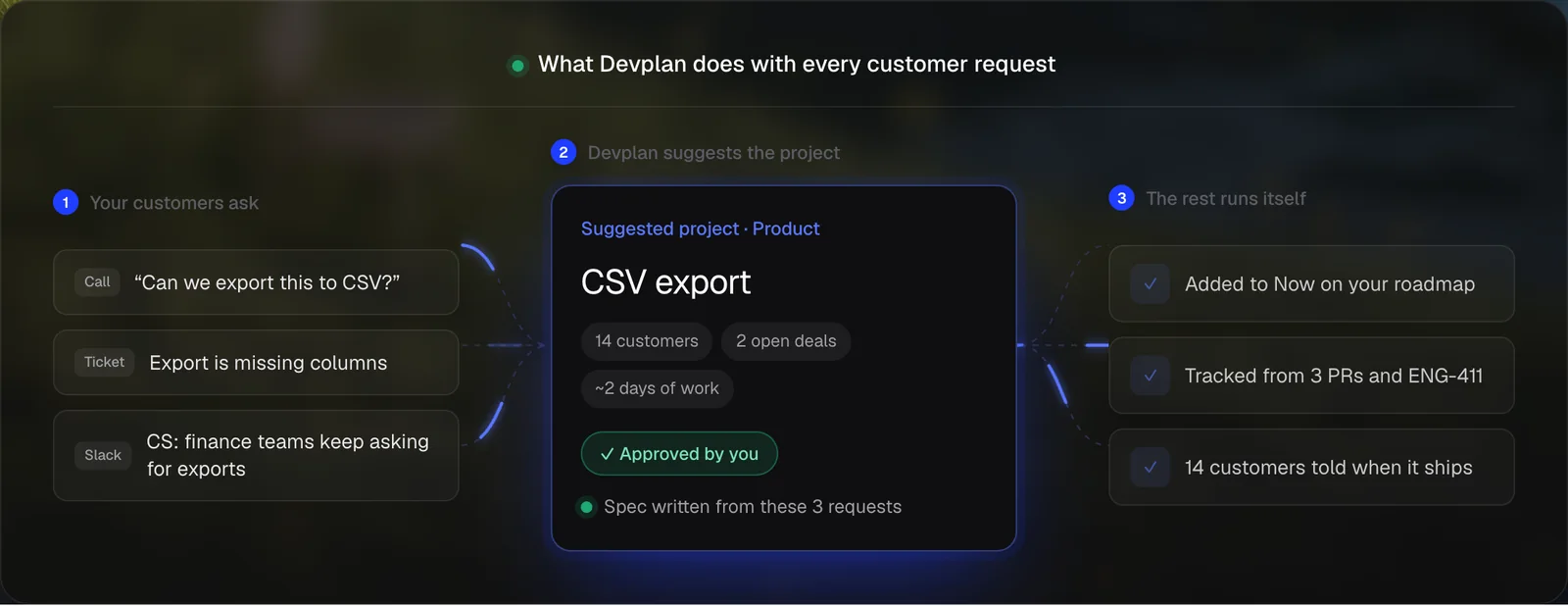
| Step | What happens |
|---|---|
| 1. Collect | Call, ticket and Slack message land in one list |
| 2. Group | All three become one request, "CSV export" |
| 3. Count | 14 customers have asked, and 2 open deals need it |
| 4. Prioritize | Engineering sizes it at about 2 days of work, so it ranks high on impact for effort |
| 5. Spec | A spec is written from the 3 requests, with links back to each one |
| 6. Close the loop | Once it ships, the 14 customers and the reps on the 2 deals are told |
Seen separately, each of those requests looks small. Grouped and counted, CSV export is a two-day project with two deals waiting on it.
Where Devplan fits
Devplan does the admin in these steps for you, from the tools you already use, and leaves the judgment calls to your team. It reads customer feedback from calls, tickets and Slack, groups related requests into project proposals, and ranks every project by customer demand, impact and effort. Each score shows the evidence behind it, and when you approve a project it's added to your roadmap.
For specs, Devplan checks your code first, so you don't spec something that already exists or is underway. It writes the PRD with every line linked to the call, ticket or file it came from, and creates fully formed tickets in Jira or Linear, or hands the work to AI coding agents such as Claude Code, Cursor and Codex. It tracks status from real work, and when the feature ships it tells the customers who asked.
If your feedback is scattered across Intercom, Zendesk, Slack and call recordings, this is how it gets into one place. Slack, Zoom and Granola connect in a few clicks, and Zendesk, Intercom, HubSpot and Salesforce are live and set up with the Devplan team. Devplan doesn't list a Gong integration, so call notes from other tools go in as file uploads. The full list is on our integrations page.
If you're comparing tools for this job, we've written fair side-by-side pages for Canny, Productboard and Enterpret.
Common mistakes
- Counting votes instead of customers. Ten votes from one account are one customer. Count distinct accounts, then weigh them by revenue.
- Letting one channel decide. If only your public feedback board feeds the roadmap, you hear from the customers who use boards. Calls and tickets often carry the larger accounts.
- Paraphrasing too early. Summaries drop the detail engineers need. Keep the original words linked to every request.
- Treating feedback as the roadmap. Customers describe problems well and solutions less well. Feedback tells you where the pain is, and strategy and effort decide what you build.
- Never telling customers it shipped. If people never hear back, they stop asking, and your best source of evidence dries up.
Frequently asked questions
What is product feedback?
Product feedback is anything customers and prospects tell you about your product: what they need, what's broken, what confuses them and what they like. In B2B software most of it arrives through sales calls, support tickets, CRM notes and internal Slack threads rather than surveys.
What are the main types of customer feedback?
A common split is feature requests, pain points, bug reports and praise. For roadmap work, feature requests and pain points matter most, and they're often the same need described two ways.
What should be included on a product roadmap?
Each roadmap item should name the problem, the customers and revenue behind it, its priority and rough effort, and its status. Linking items to the original feedback lets anyone see why it's there.
How do you prioritize feature requests?
Group duplicates, count distinct customers and the revenue at stake, then score each request against strategy and effort with a model such as RICE or an impact and effort grid. Write down the reason for every ranking.
Can ChatGPT create a product roadmap?
ChatGPT can sort and summarize feedback you paste into it, and draft a roadmap from that. It only sees what you paste, though, so it misses requests sitting in tickets, calls and Slack, and it doesn't know your code or your accounts. A tool connected to those sources, such as Devplan, works from the full picture.
About the author. Chris Bee is the co-founder and CEO of Devplan.
Build the roadmap from what customers already told you. Start free with $100 in credits, no credit card needed, or book a demo.