BlogEngineering
EngineeringDevplan
Inside Devplan’s Context Graph, Weaver
A useful product knowledge graph takes more than storing data and running semantic search. See how Devplan builds for trust, evidence, and current context.
A context graph is a structured map of an organization’s knowledge that connects people, projects, documents, systems, and decisions, enabling humans and AI to understand information in its full business context. Organizations use context graphs to make information easily discoverable by both people and AI systems. For example, a good context graph can anwer questions about how a certain feature is implemented, what changed functionaly in a product since last release or what are the risks for the next milestone. And it can answer them to any member of an organization at their own level (engineer, CPO and customer support representative will be interested about different aspects of the same question), do that fast, cheaply and reliably.
What makes a context graph work
Trust.
A context graph must be a trusted source of information. The moment a team can’t trust what it says, they go back to digging through Slack and pinging each other, and an untrusted source of truth is worse than none at all.
So trust should be at the core of every design decision when building a context graph. In practice, that translates to a few specific requirements:
- Completeness. If some data source is connected (e.g. GitHub or Slack), there should be high confidence that the system extracts all important signals from there, can reliably fetch them and keeps a complete picture of what is going on in the system.
- Evidence-based. Every definitive claim that comes out of a context graph must be backed by specific evidence items tying them to the source of truth for that claim, e.g. a PR changing behavior, a customer ticket with a bug report, a meeting note with a functionality gap discussion.
- No hallucinations. The graph should never present speculation as fact. When evidence is insufficient, response should clearly mark it as a hypothesis/assumption, not a claim, or not mention at all.
- Security and access control. A graph that leaks sensitive information cannot become the trusted source of truth. Users should see only the information they are authorized to access, while still benefiting from the broader context available to the organization.
This is the core that cannot be compromised. There are some other supporting requirements, which make context graph a great product that can be broadly adopted: efficiency of retrieval (both cost and latency wise), freshness of the data, ability to correct and customize behavior, proactive insights, and a lot of other smaller but important features.
Let’s go into the details how exactly Devplan handles those requirements and builds trusted knowledge base for organizations.
The Product Catalog is at the core
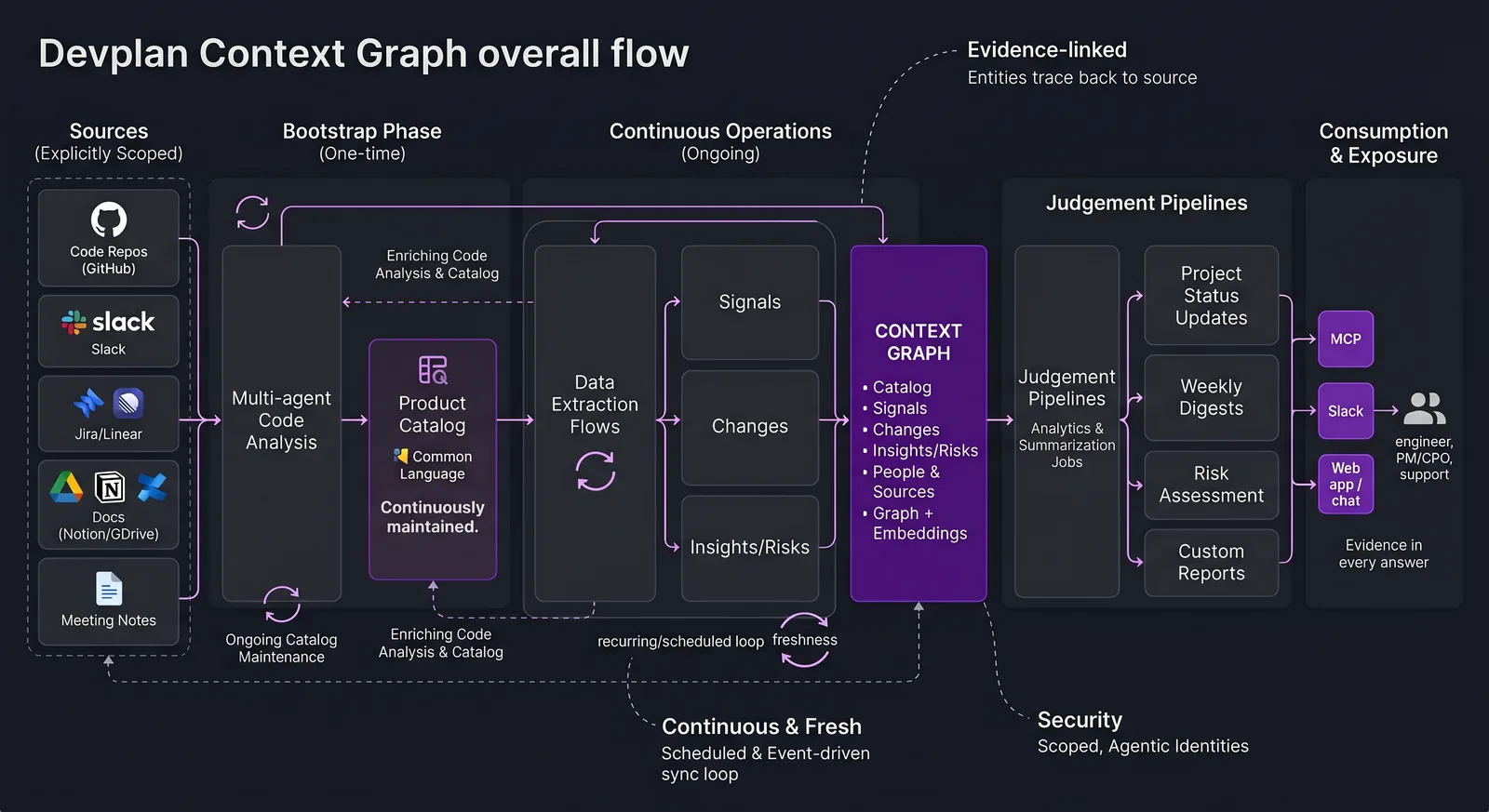
The first thing Devplan does during onboarding is Product Catalog bootstrap: a multi-agent multi-step flow analyzing all connected code repositories and extracting comprehensive map of the product. The Catalog contains all product features, connects cross-repository functionality and compiles detailed user flows and technical designs for each feature of the product. Catalog is continuously updated and maintained in a fresh state after bootstraped. Up-to-date human and AI-readable complete product description is what gives all other flows and agents described below a common language and shared product understanding.
Once Product Catalog is built, the system starts a continuous data analysis flow ensuring all incoming signals are captures and connected to the product.
Completeness
Completeness of the analysis flows rests on two things: a clearly bounded scope and an extraction process built to be exhaustive within it. Scope is explicit at connect time — you choose which Slack channels, Drive folders, Notion/Confluence roots, Jira projects, repositories and other sources are in play. Completeness is guaranteed for that declared boundary.
Within that boundary, each source type has a dedicated multi-agent extraction flow whose job is to surface every meaningful signal. Specifically Devplan programmaticaly fetches every single change happened in the analyzed period for each connected source, then runs a multi-step process against the fetched data. At each step we programmatically guarantee that each source signal is processed and captured. That enforcement allows us to mitigate consequences of AI’s probabalistic nature: Devplan guides the agents to process the data until every piece of information is handled.
Evidence-based
Every higher-level entity - a signal, an insight, a shipped change, a project risk - persists explicit references to the source items it was derived from: the PR that changed behavior, the ticket with the bug report, the meeting note where a gap was discussed. In the product these surface as evidence chips and flyouts that open onto the original message or commit; in the graph they are edges connecting each claim to its source entities.
The link is similarly enforced rather than left to the model’s good behavior: entities are validated against the evidence before they’re persisted, conclusions without adequate backing don’t get written, and weak or speculative connections are dropped instead of recorded. A claim only exists in the graph if its evidence does.
No hallucinations
Every claim is backed by previously collected evidence, with assumptions and suggestions kept separate from facts. A fact must point to the signals, changes, or source items behind it; an inference or a recommendation is labeled as such. The system enforces this, claims without evidence are rejected. In practice, this is done via a combination of prompting, AI guardrails and structured output AI output.
This applies wherever the graph is exposed - MCP, Slack, Web chat. Every fact carries its evidence and an explanation of how that evidence supports it.
Security and access control
Two things are central here. First, agents run under their own agentic identity, separate from any user’s permissions — an agent is never acting “as” a user and never inherits a user’s access. Second, capabilities are strictly scoped per flow: each agent is granted only the access and actions its task requires, and nothing more. An agent in an analysis flow can read the data it needs to analyze, but it cannot decide to open a PR, write to a source, or reach beyond its assignment. The capability set is bound to the task, not left to the agent’s discretion.
On top of that, secrets are stored per workspace with server-side envelope encryption (KMS) and aren’t exposed after creation except through controlled flows.
Efficient retrieval
Retrieval combines three things: semantic (vector) search to find what’s relevant, graph traversal to pull in what’s connected, and compressed entities so the unit of retrieval is a meaningful concept: a Signal, a Change, a Feature - rather than raw fragments. Because embeddings sit over those compressed entities instead of arbitrary text chunks, the index is smaller and sharper, and a query returns the relevant, connected context and little else - keeping both latency and token cost down. But since each claim carries links to the evidence, the system can fetch raw original source of data when needed as well.
Fresh, tunable, and proactive
Beyond the core, a few things make the graph usable day to day. It stays fresh through a mix of event-driven updates and scheduled refreshes, with the cadence tuned to how fast each source actually changes. It’s tunable: corrections, feedback, guidance, edits to summaries and risks, standing instructions for digests - feed future runs rather than just the current view, so the graph follows your team’s intent over time. And it’s proactive: instead of waiting to be queried, it clusters signals and changes into durable themes, flags emerging risks early, and reports what changed - each with its evidence attached.
Agentic flows on top
Once the graph is trustworthy — complete, evidence-based, and current — it becomes a foundation to build on. This is the real payoff: the hard part is getting the graph right, and with it in place, higher-level agentic flows become reliable, because they reason over verified, evidence-linked entities instead of raw, messy data. A few we run today:
- Daily and weekly digests — personalized summaries of what actually changed since last time, for each person at their own level, with the evidence behind every item one click away.
- Automated project tracking — project status, completion, and risks derived from the activity connected to each project, instead of asking people to write updates by hand.
- Proactive risk exposure — continuous watching of the graph for emerging risks — recurring friction, gaps between what was promised and what shipped, stalled commitments — surfaced early, each with its supporting evidence attached.
Because all of these read from the same trusted graph, they speak the same language, cite the same evidence, and stay consistent with one another.
Why a graph?
Underlying all of this is a deliberate choice of representation. It’s fair to ask why any of it needs a graph — why not just embed everything into a vector database and do similarity search, like most RAG systems?
Because the questions that drive product decisions are relationship questions, and vector search can’t answer them. Embeddings measure similarity: they’ll tell you two pieces of text are both “about onboarding.” They can’t tell you that this customer complaint caused that ticket, which was resolved by this PR, which shipped in that release.
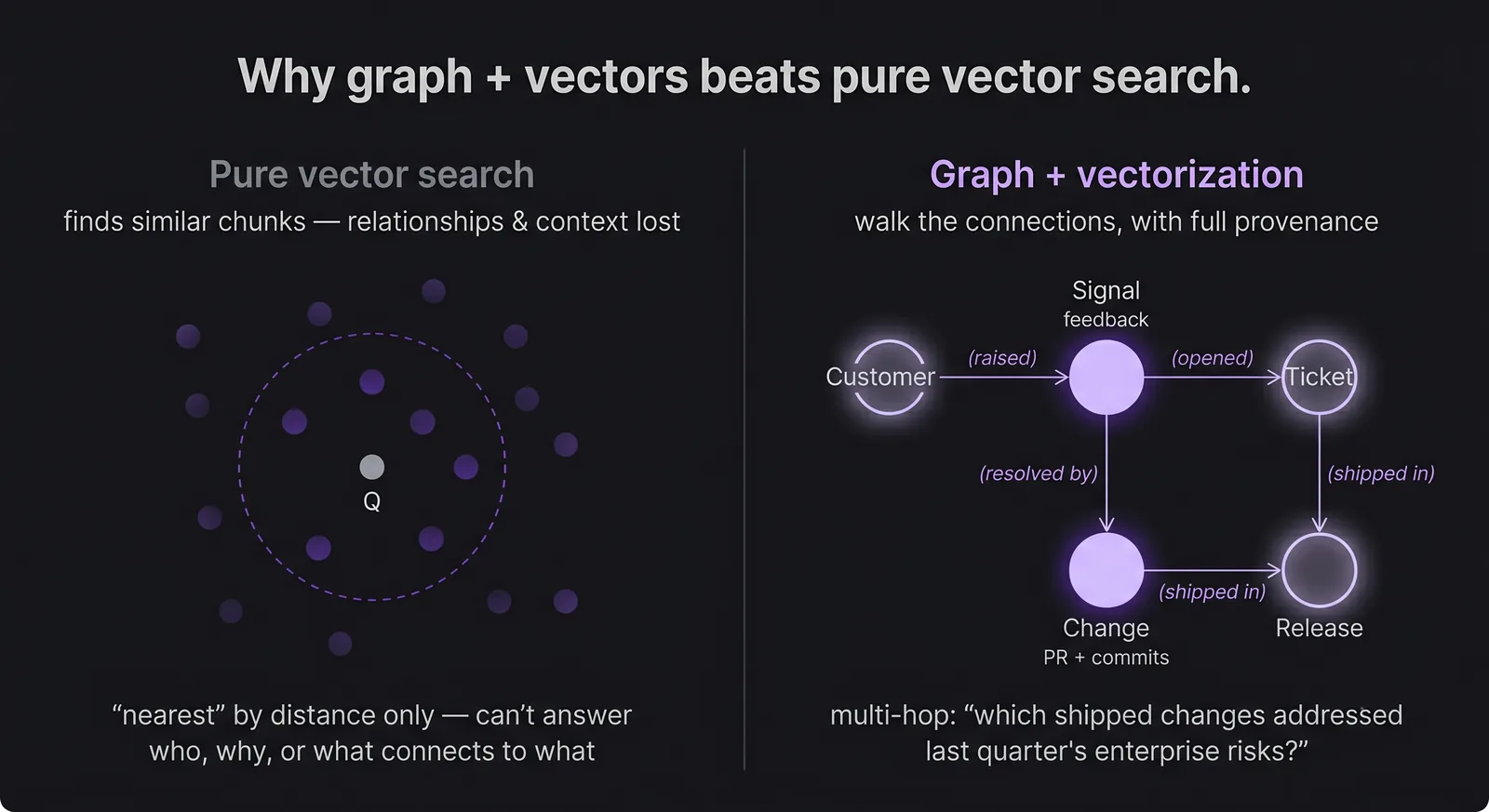
Representing knowledge as a graph makes those connections explicit — and that’s what makes the trust properties above achievable rather than aspirational:
- Provenance — every edge is a traceable link, so every claim resolves back to real evidence. This is what lets the graph be evidence-based and keeps it from hallucinating.
- Multi-hop reasoning — “which shipped changes addressed the risks raised in last quarter’s enterprise calls?” is a path through the graph, not a similarity lookup.
- Aggregate questions — “what are the top themes across all feedback this month?” is a structured query over the whole, not a handful of nearest neighbors.
- Consistency — relationships are stored, not re-guessed per query, so the same question gives the same answer.
Devplan doesn’t choose graph instead of vectors; it uses both. Vector search finds the relevant neighborhood quickly and cheaply, and the graph carries the structure, relationships, and evidence that pure similarity throws away. Anchored on the Product Catalog and kept current by continuous intake, that combination is what turns scattered activity into a context graph you can actually build decisions on — and it’s why the same graph can power everything from daily digests to early risk flags to custom reports, all of it traceable to evidence and reachable through MCP, Slack, and the web.
The future of product intelligence
The future of software development is not just faster AI execution. It is teams and agents operating from a shared understanding of what changed, why it matters, and what should happen next. We built Weaver to provide that foundation, and this is only the beginning of what a connected product intelligence layer can enable.